Why Is My Mud Agitator Vibrating Too Much?
A mud agitator normally runs with a low, steady hum. When vibration becomes noticeable — or strong enough to shake the mounting frame — it’s rarely random. In most cases, the cause traces back to one of a handful of mechanical issues, and catching it early can save you from a much more expensive repair or an unplanned shutdown.
1. Unbalanced or Damaged Impeller Blades
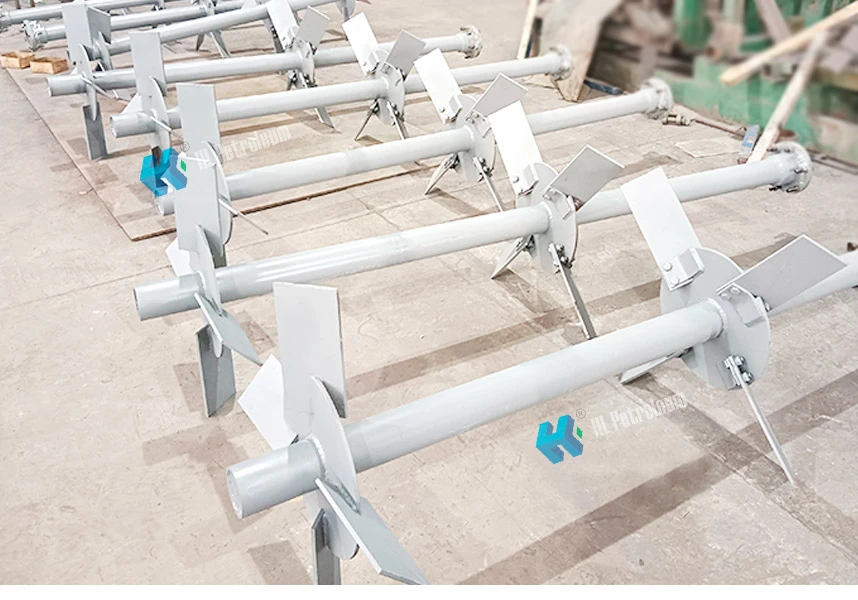
Drilling fluid carries abrasive solids, and over time this wears the impeller blades unevenly. Once one blade loses more material than the others, the impeller spins out of balance and the whole shaft starts to vibrate. Cracked or bent blades from an impact (a dropped tool, a piece of debris in the tank) cause the same problem, often more suddenly.
What to check: Shut the unit down and inspect each blade for wear, cracks, or visible bending. Compare blade thickness across the set — a noticeable difference usually confirms uneven wear.
2. Worn or Loose Bearings
Bearings support the agitator shaft and keep it running true. As they wear, the shaft develops play, and that play shows up as vibration — often paired with a grinding or rattling sound rather than a smooth hum.
What to check: With the power off, try moving the shaft slightly by hand. Noticeable play, resistance, or a rough feel when you turn it usually points to bearing wear.
3. Shaft Misalignment
If the motor and gearbox aren’t properly aligned with the agitator shaft, the whole assembly runs slightly off-axis. This is a common cause of vibration after a reinstallation, a motor replacement, or maintenance work that involved disconnecting the drive train.
What to check: Look for uneven wear patterns on the coupling and check that the motor, gearbox, and shaft centerlines line up as specified in the installation manual.
4. Loose Mounting Bolts or a Weak Support Frame
Sometimes the agitator itself is fine, but the frame or tank mount that holds it isn’t. Loose foundation bolts, a cracked mounting plate, or a frame that wasn’t rated for the load all let the unit move more than it should during operation.
What to check: Inspect all mounting bolts for tightness and look closely at the mounting plate and frame for cracks or visible flex while the unit is running.
5. Running Speed Doesn’t Match the Tank or Fluid Conditions
An agitator set to run faster than the tank design calls for can create turbulent flow that shakes the shaft, especially in a partially filled tank or with unusually thick fluid. This is less about a mechanical fault and more about a setup that doesn’t match your specific operating conditions.
What to check: Confirm your operating speed against the manufacturer’s recommended range for your tank size and fluid viscosity.
When to Repair vs. When to Replace
Worn bearings, blades, and coupling components are normal wear items — replacing them restores normal operation and is usually the right call. If the shaft itself is bent, or the frame has structural cracking, it’s worth having an engineer assess whether repair is still cost-effective compared to replacing the unit.
Keep Vibration From Coming Back
- Inspect blades and bearings on a regular schedule, not just when a problem shows up.
- Recheck alignment any time the motor, gearbox, or shaft has been disconnected for maintenance.
- Confirm mounting bolts are torqued to spec after installation and during routine checks.
- Match operating speed to your tank size and fluid conditions rather than running at a fixed default.
If you’ve worked through these checks and the vibration hasn’t gone away, our team can help you diagnose the issue or source the right replacement parts. See our mud agitator range, or learn more about our after-sales support.