There’s no single answer that applies to every rig. A screen running fine sand at moderate flow rates can last for weeks, while the same screen handling high solids loading or abrasive cuttings might need replacing within days. Instead of following a fixed schedule, most experienced crews judge screen replacement by condition and performance — and knowing what to look for makes that call much easier.
What Actually Determines Screen Life
Several factors interact to determine how long a screen lasts, and none of them work in isolation:
- Mesh size (API number): Finer mesh screens (higher API numbers) wear faster because they filter more material and carry higher differential pressure across the panel.
- Solids loading: High-solids drilling — through shale, sand, or heavily cuttings-laden formations — accelerates wear far more than clean, low-solids fluid.
- Fluid type: Oil-based and synthetic-based muds tend to be gentler on screens than water-based fluids with heavy abrasive content.
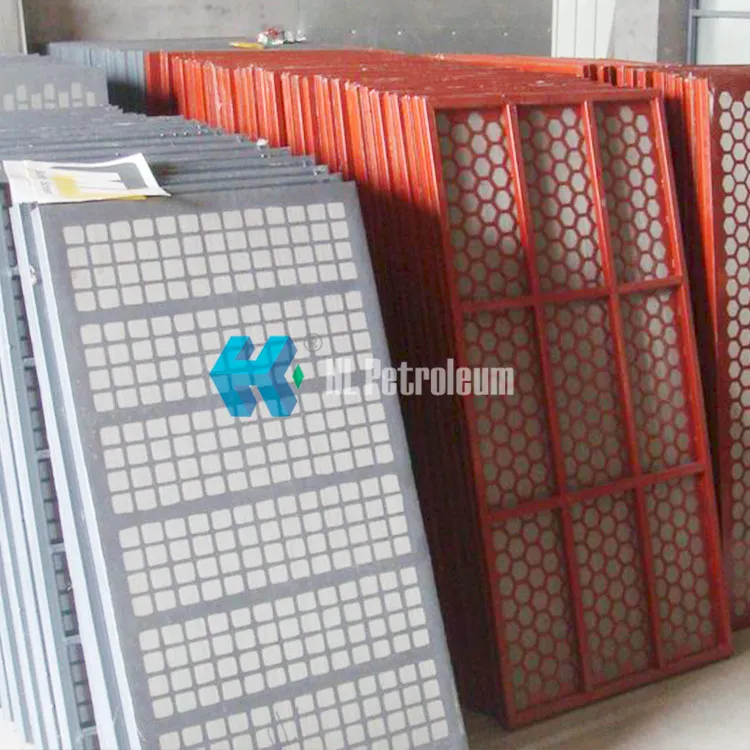
- Screen construction: Bonded composite panel screens typically outlast older hook-strip screens, since the frame distributes stress more evenly and resists tearing at the edges.
- G-force and shaker settings: Running a shaker at higher G-force increases throughput but also increases fatigue on the mesh over time.
Signs a Screen Needs Replacing
Rather than counting days, watch for these signs during routine checks:
- Visible tears or holes — even a small tear lets unprocessed solids pass straight through, defeating the purpose of that panel.
- Blinding — when the mesh openings clog with fine solids and fluid stops draining efficiently, screening capacity drops even though the screen looks intact.
- Sagging or a loose fit — a screen that no longer sits tight against the deck vibrates unevenly and wears faster at the stress points.
- Reduced fluid processing rate — if the shaker suddenly can’t keep up with flow that it previously handled fine, a worn screen is one of the first things to check.
- Visible wire wear or thinning mesh — on wire mesh screens, thinning strands near the frame edges are an early warning sign before a full tear develops.
Typical Lifespan Ranges (as a Starting Reference)
These numbers vary widely by operation, but they give a rough starting point for planning inventory and budgeting:
- Coarse mesh (API 20–80), low solids fluid: often several weeks of continuous use
- Fine mesh (API 100–230), high solids fluid: commonly just a few days to a couple of weeks
- Composite panel screens generally outlast comparable wire mesh screens under the same conditions
Treat these as a planning reference, not a replacement schedule — condition-based inspection should always take priority over a fixed calendar.
How to Extend Screen Life
- Match mesh size to the actual solids you’re processing rather than defaulting to the finest mesh available.
- Keep the shaker deck properly leveled and tensioned — a poorly tensioned screen wears unevenly and fails sooner at the weak points.
- Inspect screens during every routine equipment check, not just when a problem becomes obvious.
- Keep spare screens of the correct size and mesh in stock so a worn screen doesn’t stay in service longer than it should while you wait on a replacement.
The Real Cost of Waiting Too Long
Delaying a screen change to squeeze out a few more hours of use often costs more than it saves. A torn or blinded screen lets solids pass downstream, adding load to desanders, desilters, and centrifuges further down the system — and that extra wear on other equipment usually outweighs the cost of the screen itself.
Need the right mesh size or panel type for your shaker? Browse our shale shaker screens, or contact our team for help matching screens to your specific operating conditions.